Sunday, July 26, 2020
Using Blogger with my revised Photo Notes site.
Wednesday, May 27, 2015
iPad as a camera.
"Just this iPad" he replied.
Tuesday, May 26, 2015
Flickr Batch Download Is Available
Below is a screen shot from the Yahoo Help site that revealed this.
Step By Step
1. View photos with Camera Role Beta2. Select photos. You can use Shift key to select first and last in usual way.
3. Click on Download at bottom of window and following message pops up.
4. Next is the window for you to choose destination.
This is remembered and pre-filled on subsequent downloads. Note I am using Mac OS X
5. This is Finder showing the downloaded photos.
The Zip file is downloaded and on my Mac all I click on this and it creates a folder and copies individual photos into it, as can be seen.
Good news for me
Over the years I have used several photo management tools- Early Photoshop Elements Organiser.
- Picasa - before Google Plus ruined it.
- Lightroom 3
- Apple Aperture
- And now Lightroom CC
Monday, May 25, 2015
How To Grab Image From QuickTime
1. At required place in movie select Edit -> Copy.
2. Open Preview and select File -> New from Clipboard
3. The photo should now open in Preview where you can save it as JPG, PNG, PDF or TIFF.
You can use Preview to edit the photo before saving if you wish, or just load it into your photo editor of choice.
Of course as long as the photo editor has similar feature for creating photo from clipboard you can skip Preview and create in that editor. All my photos are first edited in Lightroom CC and I import the photo saved from Preview into this.
Sunday, May 24, 2015
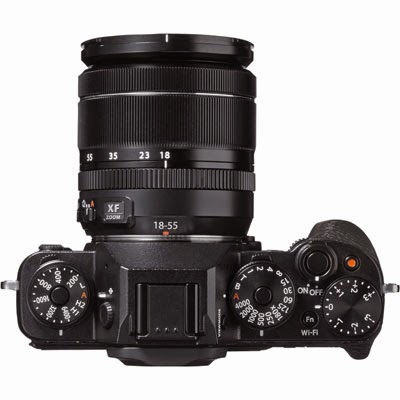
Hello Fujifilm X-T1
Now the NEX 6 served me well for 18 months, including 6 weeks travelling around Australia. I also took a Sony RX-100 II, which I still have and use all the time.
I have a lifelong interests in birds and visit the local hides occasionally where I take a few photos once I get over the embarrisment of my kit being so puny compared to the big boys with their long Canons. To this end I purchased a Sony A65 and added the Sony 55-300mm lens.
The kit performed OK but I was unsure whether it was wise to invest heavily into Sony A-mount and it still did not focus and track that well
The at my local LCE shop in Worcester I got my hands on an Olympus OM-10 and thought "this is the one for me"! Got so close to buying it but decided to wait until the Birmingham NEC Photos Show in March. So I began selling Sony kit and saved my money.
Then I got to read and handle the Fujifilm X-T1, love at first sight. Reminded me so much of my Nikon SLRs in the old film days.
So now I am happy owner of Fujifilm X-T1 with 18-55 XR 2.8-4, 55-200 XR f3.5-4.5 and 60XR f2.8 Macro.
However still not the best kit for birding, or indeed movies, so now I am considering complementing this kit with Canon 70D, or maybe 760D or even used 7D but will wait until the late June firmware release from Fuji which has some interesting updates to the AF especially for tracking and speed.
Sunday, February 23, 2014
Goodbye Nikon
The time has finally arrived when I have sold my Nikon D7000 based kit and moved over to Sony Nex-6.
A little more complicated as at first I was going to upgrade my Panasonic GX-1 to GX-7 ready for forthcoming trip to Australia. GX-1 had been good although it's LCD panel had to be replaced after 14 months. Now give Panasonic their due, this had been done free of charge although outside guarantee period but this was my 3rd Panasonic camera and the second to have developed a fault.
I was also a bit disappointed at quality of their 70-200mm lens at 200mm. It turned out cheaper for me to swap GX1 plus two lenses for Sony Nex-6 and their equivalent 2 lens, 16-45 and 50-200mm, the upgrading to GX-7, no doubt due in part to the, then unknown, imminent release of Alpha 600 to replace Nex-6.
I still think it was a good move.
Monday, February 18, 2013
How to find iMovie Finalized Movie Files
Finalizing iMovie Files
IMovie is a great program for its cost. Typical Apple software, you have to prod and probe to find out how it works and you do not have to worry how it stores files on your disk. Well I do worry.I was testing out the movie capabilities of my new indulgence, a Nikon D7000, by filming my two grand daughters. All went well, uploaded video to YouTube for rest of the family to see my master piece and then decided to Finalize project, an option in the File menu. This builds movies of various sizes so that if in the future if you use Share you will not have to wait for the movie project to be rendered.
I thought these pre-built movies could also be useful for just showing on my iMac without having to start iMovie, but where were they.
Locating the files.
Friday, November 09, 2012
Aperture and iPhoto - using multiple external editors.
Introduction
My main software in editing and cataloging my photos is Aperture. I find that I can do a lot of the editing right there in Aperture but occasionally I want to use another editor.The editors I occasionally use are- PhotoShop Elements
- When I want to simulate HDR or I want to extract parts of the image or paste additions, or use graduated filters.
- Pixelmator
- I keep trying this program but usually end up going back to PSE.
- Snapseed
- Great application when you want to give that flat looking photo a lift. Quick and can give amazing results.
- Preview
- Great when you want to quickly annotate a photo, adding say text and arrows. I added this to list after I took the following screen shots.
The irritation
Aperture and iPhoto only let you specify one external editor. This you do in the Preferences.Switching Editors
So when you want to change it form say PhotoShop Elements to Snapseed you have to navigate to your Applications folder and then scroll through files until you find the file you want.Monday, October 01, 2012
Aperture to PSE, TIF does not work but TIFF OK!
Aperture to PSE, TIF or TIFF.
In Aperture you can specify an external editor which you can use in place of the standard Aperture editor. In my case I currently use PSE (PhotoShop Elements) and I have set the option to use TIFF.When the external editor is selected for a particular file, a duplicate is made before it is opened in PSE. After editing in PSE the file is saved and replaces the duplicated photo.
TIF or TIFF
Although TIFF is chosen as the type when the file is saved PSE opts to use TIF for its extension (1 F not 2 F's) and this causes a new file to be created and so Aperture does not recognise it as the photo it duplicated and so the changes are not seen. The solution is simple, just add the extra f to TIF before you save the file.Red Admirals on last day of September
On the last day of September I was pleased to capture this fine Red Admiral butterfly in my Worcestershire garden.
Photo Details
Nikon D90 with Sigma 105mm f2.8 Macro Lens
SB900 Flash
Sunday, April 15, 2012
Review of iPad Photo Apps I use.
The above image is roughly sorted into the order of usefulness.
Editors
Photogene
A great general purpose editor with all the usual "serious photographer's" functions and with some batch tools. I cropped all the icons in this post and then batch uploaded them to Picasa Web Album all from within this app.Snapspeed
A very well designed powerful editor which uses the gestures available iPad to good effect. You can also buy a Mac version for little money.Photoshop Touch
Adobe's app that first came out for Android kit. At first sight this looks really good, powerful and logical interface that will function well after some time spent in tutorials. Main problem is that the photo is restricted to a maximum of 1600x1600 pixels, which means that you do not realise the full capability of the new iPad display.When/If Adobe update this I will spend more time on it.
PhotoToaster
This is a new addition to my apps and I am very impressed. Lots of function and masses of pre-sets for various effects but also the ability to make your own adjustments. This together with Snapspeed provides me with all the special effects I will ever need.PhotoShop Express
Adobe's free photo editing app. Useful for quick adjustments and can export direct to Flickr. Doubtful I need it now I have the above.iPhoto
Apple's much lauded photo app. Now I am a bit of a fanbois but this has dissappointed me. OK it looks fantastic, but the editing has a zany interface but basic editing is quite limited. There is also a fault that it creates duplicate copies of photos. I noticed this whan after just a few days it was taking over 1GB of space and some photos had 7 duplicates. This is well documented on the forums.I have un-installed and re-installed in the hope that I will receive notification of update that fixes the problem.
Photo Services
The above list are primarily editors. The following are tools to link to photo services, eg Flickr, Picasa etcPicasa Web Albums
View and share photos online. You can upload from iPad to specific album and copy image URL to include in web pages or add to email.FlickStackr
Similar to the above but this time for your Flickr account. Very powerful, you can update and modify most things related to your Flickr photos from this app. I use PhotoGene (see above) to upload photos from iPad to Flickr. You can add Tags but not target to a specific set but once uploaded the photo can be placed in any set from within this app.500px
Viewer for this up and coming photo service. I am quite new to 500px and only have free account but the word on the street is this is better for Pros than Flickr. Not convinced yet and still evaluating service. This app is not as powerful as the previous two.PhotoBucket
Another app for another photo sharing service. I considered using PhotoBucket as a source for photos to be used in web development. I tend to use Picasa and Flickr these days and so I do not expect to be using this much in the future.PhotoSync
Before iCloud I used this app to wireless transfer photos between iPad, iPhone and MacBook. I had deleted it but in the early days of iCloud I found my iPhone would at times discharge quickly. I was not alone in this and suspicion fell on iCloud so I disabled Photo Stream and this stopped problem. So I reinstalled this app. Now Apple seemed to have fixed the problems and I again use Photo Stream and have no battery life problem.Eye-Fi
A specialised App for those people who use an Eye-Fi card in their camera. Eye-Fi cards also provide wireless connection so photos can be shared automatically without physical connection.Camera Apps
These last two apps are primarily for taking photo, and of course movies.Camera
Apple provided camera App. Does a good job and of course no extra cost.Awesome Camera
Similar to Apple'sCamera but with some useful extra features. Note this is an iPhone app but works fine on iPad. (Strange but iPhone apps look much better on my new iPad then they did on my iPad 1.)Extra features include burst mode, delay photo until stable, interval timer, shutter delay. Also has Instagram type filters but I rather do this in Snapspeed and/ or Photo Toaster.
Thursday, March 29, 2012
DSC_5974 Sparrow Hawk Laurel Cottage 15-03-2012
See other photos of the sparrowhawk on my Flickr site.
Taken with Nikon D90 and 18-200mm lens
Sunday, March 25, 2012
Using Nikkor lens on Panasonic Lumix GX1
One of the downsides of buying the GX1 is that it a system camera and so I am temped to buy other lenses and flash guns similar to my behaviour with my D90 system.
I have a micro 4/3 to Nikon AI adapter left over from my brief affair with a GF2. I have so far attached Nikkor micro 50 mm f 2.8 (renown for its sharpness) and a Tokina 70-200 f4 ( renown for its ordinariness).
Now I expected these manual focus lens would have to be operated in stop down metering mode. In this mode usually the screen would go dim but the EVF automatically increases it's gain and remains bright. The exposure works in this mode, so if you stop down aperture the shutter speed lengthens as it should. If auto ISO is set then this may also vary.
Another good feature that as the GX1 is in manual focus by pressing the rear control button the centre part of the image is magnified.
I was very pleased with the result but there were several rejects amongst the result.
Why I chose Panasonic Lumix GX1
- Panasonic Lumix G3
- Canon G12
- Fuji X10
- Nikon P7100
The EVF is the Mark 2 with 1.44 Megapixels and very clear.
Masses to learn but so far very pleased. It has the keen amateur as its prime user with such controls as
- Mode Dial
- Exposure +- dial
- Manual focus magnifier
- Customisable quick menu and function buttons
- RAW (incidently Apple just updated Lion to support GX1 Raw
Saturday, February 04, 2012
What will be my next Quality Compact?
Requirements:
- Good Image Quality
- Use in low light without flash
- Viewfinder
- Less than £500
Shortlist:
In order of current preference:- Fuji X10
- Canon G2
- Nikon P7100
- Panasonic G3
Fuji X-10 |
![]() Canon G12 |
![]() Nikon P7100 |
![]() Panasonic Lumix G3 |
Notes
The Fuji is great to hold and use, slightly larger sensor than G12 and P7100 but a more limited range (28-212mm 35mm equivalent) with a great view finder. Reviews and comments are good.Canon is a sure bet, always at or near the top of quality compact reviews but only has 720 HD movie.
Nikon I have yet to have a go with. I nearly bought the P7000 but very slow image processing made it a none starter, but this is suppose to be fixed in P7100. Has a long range to 200mm 35mm equivalent.
Lumix get great review, very good EVF which unique in this collection displays shooting information. However although much smaller than my Nikon D90 it is quite a bit bigger than the other three when fitted with standard lens. There is a new lens available which is more compact, but increases price beyond £500. Another worry is I already have a large investment in Nikon DSLR kit, do I want to start another with 4/3 DSLR.